
Speed to lead is the time between a prospect submitting an inquiry and the first real, two-way conversation with a sales rep. The evidence is blunt: contacting a lead within an hour makes a team seven times more likely to have a meaningful conversation than waiting even one more hour. The single highest-leverage move you can make right now is cutting processing latency, the invisible delay between form submission and a human being able to act, not just pushing reps to dial faster.
TL;DR:
- Most companies respond to leads in 42 to 47 hours, far behind the under 60-second target achieved by top-performing teams through automation.
- Speed-to-conversation, the time until actual human contact, is the key metric that correlates directly with lead conversion rates.
- Balancing lead response strategies based on intent, with high-priority leads like demo requests responded to in under 60 seconds, improves overall conversion.
- Eliminating processing latency through direct integrations, automation, and AI tools can shorten response times by hours or even minutes.
- Tracking median, P75, and P95 response times, along with first-responder win rates, helps identify where your team needs improvement and how automation impacts outcomes.
Table of Contents
- What Speed to Lead Actually Measures
- Why Speed to Lead Drives Conversion: The Benchmark Data
- What Response Time Targets Should You Set?
- How to Actually Reduce Speed to Lead: A Step-by-Step Playbook
- Which KPIs Prove Speed to Lead Is Working?
- Which Channels and Cadences Actually Get Responses?
- How Real Estate Platforms Turn Speed Into Signed Deals
- What Leaders Should Actually Expect From a Speed-to-Lead Push
- Get Faster Response Times With Realtify
- Sources
- FAQ
What Speed to Lead Actually Measures
Most teams treat speed to lead as one number. It is not. There are two distinct clocks running, and confusing them is why so many "fast response" programs fail to move revenue.
Speed-to-touch is the time until the first outbound attempt: a call placed, a text sent, an auto-email fired. Speed-to-conversation is the time until the prospect actually engages back, meaning a real exchange starts. A rep can hit an impressive speed-to-touch metric by blasting an automated email in eight seconds while the prospect never opens it for six hours. Speed-to-conversation is the number that correlates with revenue, because it reflects actual human contact, not a timestamp on an outbound log.

The full formula, according to LeanData's analysis of lead conversion, breaks lead response time into two parts:
Lead response time = lead processing time + representative response time
Lead processing time covers everything that happens before a rep even sees the lead: routing logic, territory matching, data enrichment, deduplication checks, and queue assignment. Representative response time is what happens after that, the actual human action. Most organizations obsess over the second half and ignore the first, even though processing delays are usually where the minutes disappear.
Measuring this well means moving past averages. A single slow lead sitting untouched for six hours can drag a team's "average response time" up without revealing that most reps are actually fast. That is why serious RevOps teams track:
- Median response time, the midpoint that shows typical rep behavior
- P75 (75th percentile), showing how the slower-than-typical quarter of leads perform
- P95 (95th percentile), which exposes the worst-case tail where deals quietly die
To calculate any of this, you need timestamped events: lead created, lead routed, first outbound attempt, first inbound reply. Most CRMs and marketing automation platforms can log these natively if you configure the fields, but plenty of teams never bother, which means they are optimizing blind.
Why Speed to Lead Drives Conversion: The Benchmark Data
The conversion math on this is not subtle. Speed to lead is one of the few sales variables backed by decades of consistent, repeated findings, and the numbers keep pointing the same direction: faster wins, and faster wins by a wide margin.
The core stat: Leads contacted within 60 seconds convert roughly 391% better than leads contacted at the 30-minute mark. That is not a rounding advantage. That is the difference between a functioning pipeline and a leaking one.
The Harvard Business Review finding on this topic has aged remarkably well. Its audit of 2,241 U.S. companies found that reaching a lead within an hour produced meaningful qualification conversations seven times more often than waiting just one hour longer. That study is over a decade old, and the gap has not closed. If anything, buyer expectations have only gotten less patient since inboxes and phones became constant companions.
Here is the uncomfortable part: most companies are nowhere close to these targets. Market averages for lead response time still sit in the 42 to 47 hour range across many industry audits, meaning the typical company takes almost two full days to have its first real conversation with a prospect who was, at the moment of inquiry, actively interested. One 2025 field study found average time to a personalized email response was 11 hours and 54 minutes, with phone response averaging 14 hours and 29 minutes.
A few data points worth sitting with:
- Historically, only 7 to 8% of companies responded to leads within 5 minutes.
- The top decile of modern teams now reaches sub-60-second conversations by combining native web forms, workflow triggers, and AI voice agents, not by hiring more reps.
- The gap between "market average" and "top decile" performance is not a rounding error. It is measured in hours versus seconds.
This is why speed to lead deserves its own line item in a sales operations review, not a mention buried in a broader "response time" conversation. The lift is large enough, and the market is slow enough, that fixing this one variable often outperforms most other pipeline initiatives a team could invest in during a single quarter.
What Response Time Targets Should You Set?
Setting one blanket SLA for every lead is a mistake. A demo request and a whitepaper download are not the same event, and treating them identically either wastes rep capacity on cold signals or, worse, buries your hottest leads in the same queue as everyone else.
Three performance tiers show up consistently across benchmark data:
- Top decile: under 60 seconds. Reached almost exclusively through automation, meaning native form triggers connected directly to a workflow engine or an AI voice/chat agent that engages the moment a form submits.
- Median performers: 1 to 4 minutes. Achievable with well-tuned routing and a rep team that treats new-lead alerts as interrupt-priority, not a queue to check between other tasks.
- Market average: several hours to two days. This is where most companies land, largely because of manual routing, batch processing, and after-hours gaps.
Tiering your SLA by lead intent turns this from a blunt instrument into a real prioritization system:
| Lead type | Suggested response target | Why |
|---|---|---|
| Demo or consultation request | Under 60 seconds to 2 minutes | Highest buying intent; competitor is likely also being contacted |
| Pricing inquiry | Under 5 minutes | Strong intent signal; prospect is comparing options now |
| Content download (guide, checklist) | Under 30 minutes | Lower immediate intent, but still time-sensitive |
| Newsletter signup | Same business day | Low urgency; nurture sequence is appropriate |
The prioritization logic matters as much as the timing. A lead that requests a live demo or asks about pricing should never sit in the same routing queue as someone who downloaded a comparison checklist. Build your lead scoring or routing rules to flag high-intent actions (demo requests, "contact an agent" clicks, phone number submissions) for instant, interrupt-level notification, while lower-intent signals feed into a faster-but-not-instant workflow. Trying to hit sub-60-second response on every single form fill is a good way to burn out a sales team chasing leads that were never going to convert regardless of speed.
How to Actually Reduce Speed to Lead: A Step-by-Step Playbook
Most "improve your response time" advice stops at "respond faster," which is about as useful as telling someone to "sell more." Here is the operational sequence that actually closes the gap between where your team is and where the top decile operates.
-
Map your current flow and find where minutes disappear. Pull timestamps for lead creation, routing assignment, first outbound touch, and first reply on 50 to 100 recent leads. Most teams discover the biggest delay is not rep laziness, it is the gap between form submission and the lead actually landing in a rep's queue. That gap is often 10 to 40 minutes of pure processing latency before anyone even has a chance to respond.
-
Connect your forms directly to workflow triggers. If your website form feeds into a CRM that syncs on a batch schedule (every 15 minutes, hourly, or worse), you have already lost the race before a rep is involved. Native form integrations paired with real-time workflow automation (tools like HubSpot Workflows, Salesforce Flow, or a dedicated routing layer) eliminate that sync delay entirely.
-
Deploy instant engagement for the first touch. This is where AI-native tools change the equation. An AI voice agent or a targeted SMS triggered the instant a form submits can start a qualifying conversation before a human rep even opens their laptop. Pair this with an instant scheduling link (Calendly-style booking embedded in the confirmation message) so a hot lead can grab a slot on a rep's calendar without waiting for anyone to call back.
-
Build routing rules that account for rep capacity, not just territory. Round-robin routing sounds fair but often sends a hot lead to a rep who is mid-call with someone else. Capacity-aware routing checks who is actually available right now and routes accordingly, which shortens representative response time even when lead processing time is already tight.
-
Design fallbacks for the moments automation cannot cover. After-hours inquiries, missed call attempts, and reps who are unexpectedly out all need a defined next step. A cross-channel fallback, an SMS if a call goes unanswered, followed by an email with a direct scheduling link, keeps the lead warm instead of letting it go cold until 9 a.m. the next business day.
-
Pilot on one segment, then instrument alerts before scaling. Do not roll this out to every lead source at once. Pick your highest-value segment (demo requests are a good starting point), run the new workflow for two to three weeks, and build SLA alerting so a manager gets notified the moment a lead sits unassigned past your target window. Pair this with a capacity dashboard so you can see rep load in real time, not after the fact.
Pro Tip: Do not automate the entire first touch and call it done. The teams getting the best return pair an AI agent for instant acknowledgment with a human for the actual qualifying conversation, because hybrid AI-plus-human pods consistently outperform pure-AI setups on meetings booked per dollar spent.
Which KPIs Prove Speed to Lead Is Working?
Tracking "average response time" and calling it a day is how teams miss the real story. A handful of specific metrics tell you whether your speed-to-lead investment is actually paying off, and where it is still leaking.
Track these as your core set:
- Speed-to-conversation, not just speed-to-touch, since a fired-off automated email that nobody reads does not count as engagement.
- Median, P75, and P95 response times, so you can see typical performance alongside your worst-case tail.
- First-responder win rate, the percentage of deals won by whichever rep or channel made contact first, which directly ties speed to revenue outcome.
- Conversion rate per lead, segmented by response-time bucket (under 1 minute, 1 to 5 minutes, 5 to 60 minutes, over an hour), so you can see the conversion cliff for yourself.
None of these numbers mean much as a single blended figure. Slice them by lead source (paid search converts differently than referral), by campaign, by individual rep or team, and by hour of day. A team that looks great on paper during business hours can be quietly bleeding leads submitted at 7 p.m. that sit untouched until the next morning.
Set up SLA alerting so a lead crossing your target threshold triggers a notification to a manager, not just a report reviewed weeks later. Run a periodic P95 check, monthly at minimum, because that tail percentile is where your slowest-handled leads live, and those are often your most expensive marketing-sourced leads going to waste. Once you have a few months of data, connect the dots explicitly: pull win rates for the sub-60-second cohort against the multi-hour cohort and put that comparison in front of leadership. That is the number that gets budget approved for further automation investment.
Which Channels and Cadences Actually Get Responses?
Channel choice is not a matter of preference, it is a matter of matching the medium to the intent behind the lead. Using the wrong channel for a hot lead, or a low-key one for high urgency, wastes the speed advantage you just built.
A few rules of thumb hold up consistently:
- Call for high-intent leads. A demo request or pricing inquiry deserves a live phone attempt first. Voice conversation qualifies faster than any other channel and signals you take the inquiry seriously.
- SMS for fast scheduling and confirmations. Text messages get read within minutes far more reliably than email, making them ideal for nudging a lead toward booking a time slot.
- Email as the durable follow-up layer. Email will not get you a same-hour response, but it survives as a record the prospect can return to when a call gets missed.
A cadence that reflects what actually works in practice looks something like this:
- Instant automated acknowledgment (confirms the inquiry was received, sets expectations)
- Live call attempt within minutes of submission
- SMS fallback if the call goes unanswered
- Email plus a direct calendar link sent same day if SMS gets no reply
- Lower-frequency nurture sequence for leads that go quiet after the first few touches
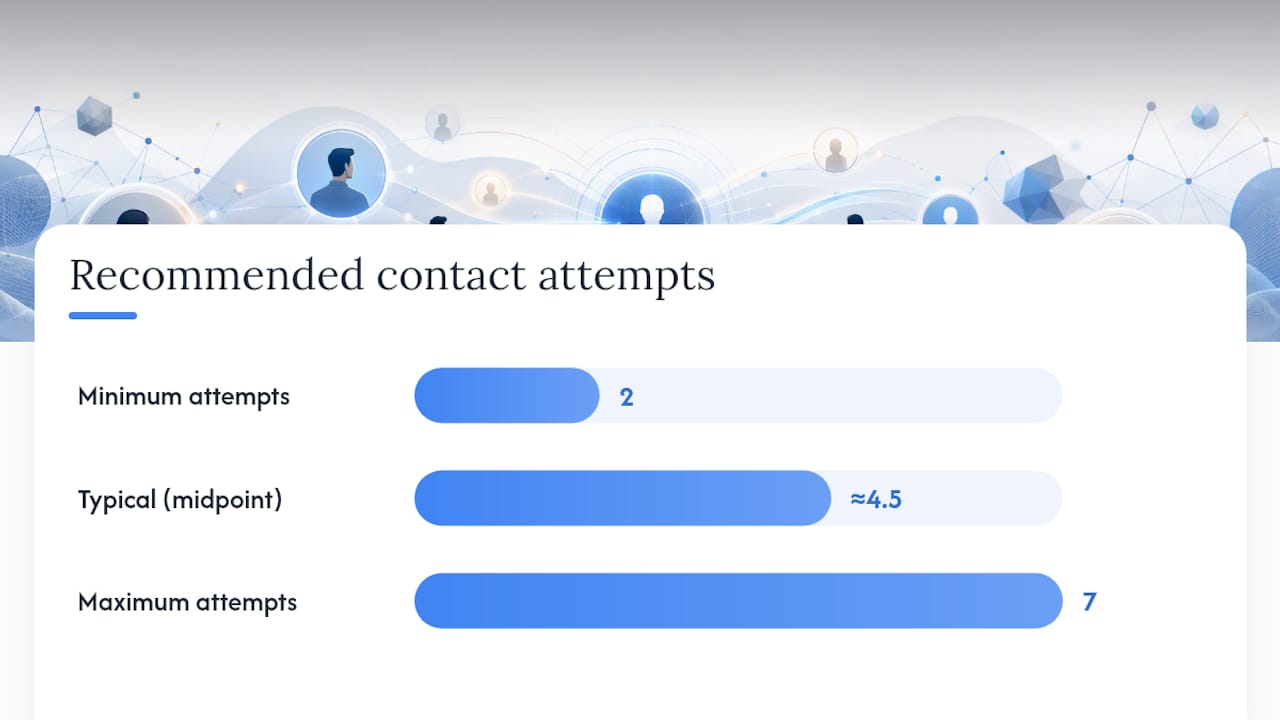
Attempt counts matter more than most reps assume. Research on cadence performance consistently points to 2 to 7 attempts spread across roughly 6 to 8 days as the sweet spot. Pushing past that range rarely improves conversion and starts to annoy prospects who have already told you, through their silence, that timing is not right. The instinct to "just try one more time" past attempt seven is usually where diminishing returns turn into active harm to the relationship.
How Real Estate Platforms Turn Speed Into Signed Deals
Real estate is one of the sharpest examples of why speed to lead matters, because property inquiries are almost always time-sensitive. A buyer who fills out a form on three listings in one evening is going to talk to whichever agent responds first, and the other two conversations may never happen.
Realtify's structure addresses several of the friction points that slow real estate teams down specifically:
- Direct messaging between buyers/renters and agents removes the routing and forwarding delay common on generalist listing sites, where an inquiry might bounce through a call center before it ever reaches the agent who actually knows the property.
- Verified agent profiles mean a prospect is not guessing whether the person responding actually knows the listing, which cuts the back-and-forth that normally happens while a buyer tries to confirm they are talking to someone credible.
- Listing context tied directly to the conversation lets an agent skip the "which property are you asking about" step, speeding up qualification because the details are already attached to the inquiry.
- An analytics dashboard gives agents and brokerages visibility into their own response patterns, useful for anyone trying to apply the median/P75/P95 measurement approach covered earlier to their own real estate business.
None of this replaces the fundamentals covered in the playbook above. Routing rules, cadence discipline, and SLA tracking still apply. But a platform built around direct agent-to-client communication removes several of the structural delays that generalist listing sites tend to introduce by default.
What Leaders Should Actually Expect From a Speed-to-Lead Push
Automation gets the headlines, but the conversation quality still comes from a human who knows the product and reads the room. The realistic goal is not replacing reps with AI agents, it is using automation to eliminate the dead time before a human gets involved, then letting the human do what humans still do better: build trust in a real conversation.
Phase your pilot narrowly. Pick one high-intent lead segment, run it for a few weeks, and measure first-responder win rate before rolling anything out further. The most common failure I see is not technical, it is cultural: nobody owns the metric, after-hours coverage gets treated as optional, and the initial excitement fades once the pilot's early wins stop feeling new. Assign explicit ownership before you start, not after the dashboard goes quiet.
— Jadin
Get Faster Response Times With Realtify
Realtify gives real estate agents a shortcut most generalist listing sites cannot match: direct messaging with buyers and renters, no middleman and no transaction fees standing between an inquiry and a conversation. That structural difference is what closes the gap this article has been building toward, because every routing delay and enrichment step covered above is friction Realtify's direct-messaging model was built to remove.
For agents, getting started is straightforward. Set up your own agent profile with your credentials and specialties clearly listed, so prospects arrive already trusting who they are talking to. Use the listing management tools to keep your active properties current, since a stale listing generates inquiries you cannot actually fulfill fast. Then lean on the analytics dashboard to track your own response times against the benchmarks covered here, median, P75, and P95, so you know exactly where your speed stands.
If you are ready to see how curated listings and direct agent access work together, browse current properties on Realtify or set up your agent profile today to start receiving inquiries you can respond to in minutes, not days.
Sources
- The Short Life of Online Sales Leads (Harvard Business Review)
- How to get speed-to-lead under one minute (Close blog)
- Speed-to-lead is the key to lead conversion (LeanData)
- Automate lead follow-up without sounding robotic (Localbot)
FAQ
What Does Speed to Lead Mean?
Speed to lead is the time between a prospect submitting an inquiry and the first real conversation with a sales rep, measured in two parts: how fast a rep is notified (speed-to-touch) and how fast a genuine exchange starts (speed-to-conversation). The second measure correlates far more closely with conversion, since a fast automated email nobody opens does not move a deal forward.
How Important Is Speed to Lead for Conversion Rates?
Speed to lead is one of the most well-documented conversion levers in sales, with leads contacted within 60 seconds converting roughly 391% better than those contacted at 30 minutes. Contacting a lead within an hour also makes a meaningful conversation seven times more likely than waiting just one more hour.
Is Focusing on Speed to Lead Actually Worth the Investment?
Yes. The consistent gap between market averages (42 to 47 hours) and top-decile performance (under 60 seconds) means most companies are leaving conversions on the table simply by being slow. Platforms like Realtify that build direct messaging into the core product address part of this gap structurally, by removing the routing delay a generalist site introduces by default.
What Should Real Estate Agents Do First to Improve Response Time?
Start by measuring your current baseline: how long does it take from an inquiry landing to your first real reply? Setting up a verified agent profile with direct messaging removes a step most listing platforms add through call centers or forwarded inquiries, and it gives you a clear starting point to track improvement against.